Introduction
Your VPN drops at 7 AM. Your remote employee can't access the client portal. The internal IT contact isn't answering yet—and won't be for another hour.
This scenario plays out daily across Utah's small and mid-sized businesses. Gallup data shows 52% of remote-capable U.S. employees now work hybrid, and the IT infrastructure most SMBs built for on-site work simply wasn't designed to support that reality.
That hybrid shift puts real pressure on IT: distributed teams need faster response times, stronger endpoint security, and support that doesn't clock out at 5 PM. For most SMBs, hiring enough staff to cover those needs costs more than the problem itself. Outsourced IT help desk support exists precisely for this — a purpose-built solution for how modern teams actually work.
This article covers why in-house IT breaks down for remote teams, what scalable outsourced support looks like in practice, and how to choose the right provider.
Key Takeaways
- In-house IT built for on-site work fails remote teams on response time, security, and after-hours coverage
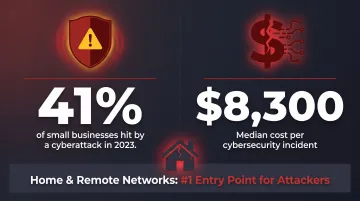
- 41% of small businesses were hit by a cyberattack in 2023, and home networks are a primary entry point
- Outsourced help desks typically cost $24,000–$84,000/year for 10–50 users—far less than one full-time IT hire
- Scalable support absorbs team growth without re-hiring or retraining
- The right partner delivers proactive monitoring, clear SLAs, and compliance coverage for frameworks like HIPAA or SOC 2
Why In-House IT Support Breaks Down for Remote Teams
Most small business IT setups were designed around a single shared network, one IT contact, and in-person troubleshooting. None of that scales when employees are spread across home offices, client sites, and different time zones.
The Capacity Problem
According to Indeed, the average IT staff-to-employee ratio for businesses under 500 employees is roughly 1:18—and service desk ratios can stretch to 1:200. One or two internal IT staff cannot realistically monitor endpoints, respond to tickets, manage cloud access, and handle security incidents at the same time. Add flexible hours and time zone differences, and the coverage gaps multiply fast.
Internal staff also work standard business hours. A remote employee locked out of their account at 6 AM or troubleshooting a connection issue on a Saturday gets a voicemail—not a solution.
The Security Blind Spot
Home networks don't have enterprise firewalls. Employees use personal routers, consumer-grade Wi-Fi, and sometimes unmanaged devices. That spread makes continuous endpoint monitoring nearly impossible for a lean internal team.
The SBA reported in 2024 that 41% of small businesses were victims of a cyberattack in 2023, with a median cost of $8,300—and remote workers' home systems were specifically flagged as common entry points.
Reactive vs. Proactive
Internal SMB IT teams typically respond to problems after they've already disrupted someone's workday. There's no one monitoring for anomalies at 2 AM, and there's usually no redundancy when the IT person is out sick.
For distributed teams, that gap between "something broke" and "someone's working on it" is where hours—and productivity—disappear.
Key Benefits of Outsourcing Your IT Help Desk for Remote Teams
24/7 Availability Without the Overhead
Outsourced help desks are staffed around the clock. A remote employee with a critical access issue at 6 AM gets a live technician—not a ticket that sits until Monday. This is the single most direct pain point that in-house support cannot solve without significant cost.
The Real Cost Comparison: In-House vs. Outsourced
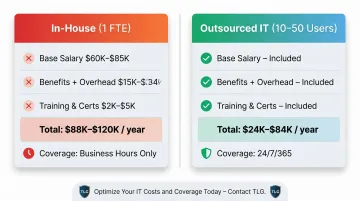
Hiring even one dedicated IT support specialist costs more than most SMBs expect. The BLS reports a median annual wage of $61,550 for computer support specialists, and once you factor in benefits, training, and overhead, total cost reaches $88,000–$120,000 per year.
Compare that to outsourced IT support for a 10–50 user firm, which typically runs $24,000–$84,000 per year—with 24/7 coverage included.
| Cost Component | In-House (1 FTE) | Outsourced (10–50 users) |
|---|---|---|
| Base salary | $60,000–$85,000/yr | N/A |
| Benefits + overhead | $15,000–$34,000/yr | Included |
| Training + certifications | $2,000–$5,000/yr | Included |
| Total annual cost | $88,000–$120,000 | $24,000–$84,000 |
| Coverage | Business hours only | 24/7/365 |
True Scalability
Onboard five new remote employees next quarter? A good outsourced provider absorbs that demand without a hiring process. Open a new location? Same coverage, same SLAs, no ramp-up lag.
Contrast that with expanding an in-house team: job posting, interviews, onboarding, training—minimum three to four months before anyone's fully productive.
Stronger Security for Distributed Environments
Outsourced IT providers bring security tools that most SMBs can't cost-justify on their own:
- Endpoint monitoring across all remote devices
- MFA enforcement and access control
- VPN management for secure remote connections
- Real-time threat detection and response
This matters especially for businesses in regulated industries.
For dental practices and healthcare-adjacent SMBs, HIPAA applies to remote workers too. Small practices accounted for 55% of OCR financial penalties in 2022, with missing Business Associate Agreements and unsecured communications topping the violation list. When evaluating providers, verify they understand HIPAA scope for remote environments and will sign a Business Associate Agreement before any work begins.
Access to Specialized Expertise
Security and compliance are just one layer of that expertise. Beyond those requirements, one internal generalist can't match the depth of a provider's full bench. Outsourced help desks give SMBs access to cloud architects, security analysts, and compliance specialists on demand, without putting each of them on payroll.
What Scalable IT Help Desk Support Actually Looks Like
Tiered Support Structure
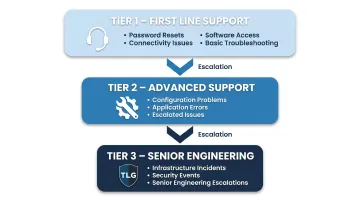
A well-run outsourced help desk operates across tiers, routing each issue to the right level of expertise:
- Tier 1 — Password resets, connectivity issues, software access, basic troubleshooting
- Tier 2 — Configuration problems, application errors, escalated user issues
- Tier 3 — Infrastructure incidents, security events, senior engineering escalations
This structure matters because it keeps costs in check. You're not paying senior engineer rates for a password reset, and you're not asking a Tier 1 agent to handle a network security incident.
Remote Endpoint and Device Management
For distributed teams, endpoint management isn't optional. A good provider handles:
- Monitoring every device on the network in real time
- Pushing security patches and software updates automatically
- Enforcing policies like screen lock and encryption
- Provisioning or wiping devices remotely, no on-site visit needed
For employees working from home on company laptops, this is the layer of protection that makes remote work viable without turning it into a security liability.
Cloud Access and Identity Management
Remote team security is most commonly compromised through cloud application access—weak credentials, shared logins, and unmanaged account provisioning. Providers that manage SSO and enforce MFA across platforms like Microsoft 365 close these gaps at the source.
Only 27% of businesses with up to 25 employees have adopted MFA. An outsourced provider that enforces MFA as a baseline—not an upsell—can meaningfully reduce breach risk from day one.
Proactive Monitoring vs. Break-Fix
With break-fix support, you call when something's already broken. Proactive monitoring catches anomalies, slow performance, or threat indicators before they cause an outage.
For remote teams, the difference is significant. There's no IT person nearby while a fix is in progress—downtime affects productivity directly and immediately. The Local Guy's 24/7 proactive monitoring is designed to identify and address problems at the earliest signal—before they turn into outages that cost time and revenue.
How to Integrate an Outsourced Help Desk with Your Remote Team
Successful integration depends on what happens before the provider takes their first ticket.
Start with a thorough documentation handoff. The provider needs your network diagrams, software inventory, user roles, and escalation contacts from day one. Generic onboarding playbooks fail quickly — providers need documentation tailored to your specific applications, user workflows, and configurations.
From there, build a clear communication framework. Remote employees need to know exactly how to reach IT support and what to expect back. That means:
- A dedicated support email or phone number
- A ticketing system (integrated with Slack or Teams if possible)
- Published SLA targets by priority level—P1 issues (complete business stoppage) should carry a 15–30 minute first-response target; P3 issues (minor impact, workaround exists) can reasonably allow 4–8 hours
Once the framework is in place, run a brief training session for your team. Employees who don't know how to submit a ticket, what information to include, or when to escalate create friction that slows resolution times. A short onboarding session and a one-page reference guide reduce that friction significantly.
Finally, retain visibility into ticket data. You should have access to resolution metrics and trend reporting throughout the engagement — not just when something goes wrong. That data is how you hold a provider accountable and catch recurring issues before they become patterns.
What to Look For When Choosing an IT Help Desk Partner
Responsiveness and SLA Transparency
Any provider worth working with will commit to specific response and resolution times in writing. Ask about:
- Average first-response time by priority level
- Escalation paths when the initial tier can't resolve the issue
- What happens when an SLA is missed
Industry benchmarks set P1 first-response at 15–30 minutes and resolution at 4 hours. Use those numbers as a baseline when comparing providers — any vendor that won't match them in writing is making a promise they can't keep.
Compliance Knowledge for Your Industry
If your business handles patient records, financial data, or any regulated information, a generalist IT provider may not be equipped to help. Your provider should understand your compliance obligations—HIPAA, PCI-DSS, FTC Safeguards Rule—and demonstrate specifically how their remote support practices align with those requirements.
For dental practices in particular, this means the provider must be prepared to sign a Business Associate Agreement and implement HIPAA's required technical safeguards for any systems that touch patient data.
Local Accountability vs. National Scale
Those compliance obligations don't just require technical knowledge — they require a provider who's accountable when something goes wrong. Large national platforms offer broad resources, but support often routes through distributed call centers where no one knows your business context.
Local providers operate differently. They know your team, your industry, and what's at stake for your specific operation.
For Utah SMBs, that distinction is tangible. The Local Guy has served Utah businesses for over 35 years with a Utah-based support team. When something breaks for your remote team at 10 PM, you're reaching people who are personally invested in the outcome — not a technician working off a script they've never seen before.
Frequently Asked Questions
Is outsourcing IT support legal in the US?
Yes — completely legal. There's no single U.S. law governing IT outsourcing—arrangements are governed by contract law and applicable industry regulations like HIPAA, GLBA, and the FTC Safeguards Rule. Contracts should address data handling, confidentiality, and any compliance obligations specific to your industry.
What does an outsourced IT help desk actually do for remote employees?
They handle technical issues remotely via phone, chat, or remote desktop tools—password resets, software troubleshooting, device access problems, connectivity issues. Most outsourced providers resolve these faster and with more coverage hours than an in-house team can match.
How much does outsourcing IT help desk support cost for a small business?
Pricing is typically per user per month. Most SMBs pay $100–$200 per user per month for full managed IT including a help desk — help-desk-only arrangements run lower, with a 10–50 user firm spending roughly $24,000–$84,000 annually. That's significantly less than one full-time IT hire with benefits.
Can outsourced IT support handle employees in different time zones?
Yes. 24/7 staffing is a core feature of outsourced help desks, not an add-on. Time zone differences become irrelevant—remote employees get support when they need it, regardless of the hour.
What's the difference between managed IT services and an outsourced help desk?
An outsourced help desk focuses on end-user support: troubleshooting day-to-day issues via tickets. Managed IT services go further, covering proactive infrastructure monitoring, security management, cloud oversight, and strategic IT planning. Many providers, including The Local Guy, offer both under one agreement.
How do I know if my remote team needs outsourced IT support?
Watch for recurring downtime, no after-hours coverage, a growing remote headcount without an IT scaling plan, compliance gaps, or unpredictable monthly costs. If two or more of these apply, outsourcing is worth a serious look.