Introduction
Picture this: it's 11 PM on a Friday. Your payment processor goes offline. Customers can't check out, your team can't process orders, and your IT provider's voicemail says "we'll be back Monday at 8 AM."
For most small businesses, that's not a hypothetical — it's a real exposure. Small businesses in 2026 operate around the clock, but many still rely on support that clocks out at 5 PM.
The stakes are real. According to IBM's 2024 Cost of a Data Breach Report, organizations with fewer than 500 employees faced an average breach cost of $3.31 million — often because incidents go undetected until business hours resume.
This article breaks down what 24/7 IT support actually means, why Utah small businesses need it now, and how to find a provider worth trusting.
Key Takeaways
- 24/7 IT support combines automated monitoring with human response — available every hour, every day
- Over 70% of ransomware encryption events happen between 6 PM and 8 AM, when most SMBs have no coverage
- Outsourcing beats in-house: a single IT administrator costs $96,800+ annually before benefits or shift coverage
- Look for providers with real SLAs, proactive monitoring, and proven industry experience — not just an answering service
- The Local Guy brings 35+ years of Utah-based IT experience — covering monitoring, cybersecurity, and helpdesk support for local SMBs
What Is 24/7 IT Support?
24/7 IT support means IT professionals — or automated monitoring systems backed by human experts — are available to detect, respond to, and resolve technical issues at any hour, any day of the year. That includes weekends, holidays, and 2 AM system failures.
How It Differs from Traditional IT Support
Traditional break-fix IT is purely reactive: something breaks, you call, someone eventually shows up. Business-hours-only support works the same way — you just can't even make the call until Monday morning.
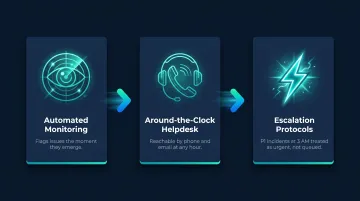
True 24/7 support flips that model. It combines:
- Proactive monitoring — automated tools watch your systems continuously for anomalies
- On-demand response — a staffed helpdesk reachable when problems surface
- Escalation protocols — critical incidents get routed to qualified technicians immediately, not queued until morning
What "24/7" Actually Looks Like in Practice
Understanding the model is one thing — knowing what it looks like day-to-day is another. For small businesses, it doesn't mean a technician sleeping in your server room. In practice, it means:
- Automated alerts that catch issues the moment they emerge
- A helpdesk reachable by phone and email around the clock
- Clear escalation paths so a P1 incident at 3 AM gets treated as urgent — not as a morning ticket
Why Small Businesses Can't Afford Limited IT Support
Cyber Threats Don't Work Business Hours
Attackers specifically target off-hours because they know most small businesses have nobody watching. Research cited by Cybersecurity Dive found that more than 70% of ransomware encryption events in 2024 occurred between 6 PM and 8 AM, with roughly 30% starting on weekends. More than half of ransomware attacks over the prior year hit during a holiday or weekend.
That timing isn't coincidence — it's strategy.
The Real Cost of Going Dark After Hours
Every minute a critical system is offline translates to lost revenue, stalled employees, and eroding customer trust. The damage compounds fast. A corrupted backup discovered Friday night that nobody addresses until Monday becomes a multi-day recovery effort — data loss, manual workarounds, and delayed operations all stacking up before the week even starts.
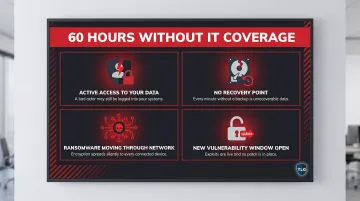
Consider what can go wrong undetected over 60 hours:
- A compromised account with active access to your data
- A failed backup leaving you with no recovery point
- A ransomware payload spreading quietly through your network
- A missed software update creating a new vulnerability
Remote Work Changed the Timeline
Those 60 hours of exposure don't just apply to empty offices. With employees working evenings, weekends, or across time zones, IT issues no longer align with traditional schedules. When a remote employee can't access a shared drive at 7 PM on a Tuesday, waiting until morning costs real productivity — and for deadline-driven work, it can cost the client relationship too.
Compliance Doesn't Take Weekends Off
For regulated industries, the stakes go beyond revenue. Healthcare practices (including dental offices) operating under HIPAA, retailers under PCI-DSS, and financial firms under GLBA face strict requirements around access controls, audit logging, and incident response. An undetected breach that sits over a weekend doesn't just cost money — it triggers mandatory reporting obligations, audit failures, and potential fines that no quarterly budget accounts for.
Key Benefits of 24/7 IT Support for Small Businesses
Continuous Threat Monitoring and Faster Incident Response
Automated monitoring tools flag anomalies immediately: unusual login attempts, network irregularities, failing hardware. Problems surface in real time, not hours later when the first staff member arrives.
Response speed is the critical variable. A ransomware attack detected at 3 AM and contained within minutes causes far less damage than one discovered at 8 AM after spreading overnight. IBM's research shows that extensive use of security AI and automation reduced breach costs by approximately $2.2 million on average in 2024. Faster detection drives that number down.
Reduced Downtime and Stronger Business Continuity
There's a meaningful difference between proactive and reactive support:
- Proactive: patch management, performance checks, hardware health monitoring; problems prevented before they happen
- Reactive: responding after a system is already down, data is already compromised, or a client is already affected
Proactive support protects revenue and customer relationships. For small businesses where every customer interaction has weight, the difference between a prevented outage and a Monday-morning crisis isn't abstract — it shows up directly in the books.
Cost Savings Compared to In-House Coverage
Running true 24/7 in-house IT coverage requires multiple full-time employees across rotating shifts. According to the Bureau of Labor Statistics, the national median wage for network and computer systems administrators was $96,800 in May 2024 — before benefits, training, or the additional headcount needed to cover nights and weekends.
Managed IT support delivers equivalent or broader coverage at a predictable monthly cost. The fixed-fee model also removes the unpredictable expense spikes that come with emergency repairs or breach recovery.
Support for Remote Teams and Scalability
The cost and continuity advantages extend into how teams actually operate day to day:
- Remote and after-hours workers get immediate help instead of losing hours waiting for a helpdesk to open. For businesses with hybrid teams or evening shifts, this directly enables how people actually work.
- Scalability: a strong 24/7 IT partner grows with the business — adding users, devices, and locations without creating gaps in coverage. That's long-term infrastructure, not a stopgap.
What's Typically Included in a 24/7 IT Support Plan
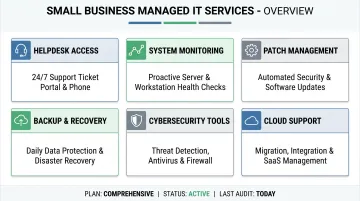
A credible 24/7 managed IT plan should include all of the following:
| Service | What It Covers |
|---|---|
| 24/7 Helpdesk Access | Phone and email support available any hour |
| System & Network Monitoring | Automated alerts for anomalies, downtime, and threats |
| Patch & Update Management | Scheduled updates to prevent vulnerabilities |
| Data Backup & Disaster Recovery | Regular backups with tested recovery procedures |
| Cybersecurity Tools | Endpoint protection, firewall management, threat detection |
| Cloud Solution Support | Microsoft 365, cloud hosting, remote access management |
Compliance Consulting
For regulated industries, compliance support should be part of the conversation. Before signing with any provider, confirm they explicitly map your regulatory requirements in their service scope:
- Healthcare and dental offices: HIPAA technical safeguards (45 CFR 164.312) covering access controls, audit logs, and encryption
- Retailers processing card payments: PCI-DSS-aligned logging, incident response, and network segmentation
Fully Managed vs. Co-Managed
- Fully managed: best for businesses with no internal IT staff — the provider owns all IT operations end to end
- Co-managed: best for businesses that already have an in-house IT person but need after-hours coverage or specialized expertise the generalist can't cover alone
If you have one IT generalist and no after-hours coverage, co-managed often fills the gap efficiently.
How to Choose the Right 24/7 IT Support Provider
Verify True 24/7 Availability
Many providers advertise "24/7 support" but deliver an answering service or a ticket queue overnight — not actual resolution. Ask specific questions:
- What is the guaranteed response time for a critical outage at 2 AM?
- Who handles escalations after hours — a live technician or an automated queue?
- What does your SLA specify by incident severity?
The Service Level Agreement should define response time tiers (P1, P2, P3), escalation procedures, and accountability measures when SLAs aren't met. If a provider can't show you that document, keep looking.
Prioritize Proactive Over Reactive
Ask directly: "Do you wait for us to report problems, or do you monitor and alert us first?" The answer reveals the support philosophy. A genuinely proactive provider has documented processes for automated alerts, scheduled maintenance windows, and regular system health reporting — not just a fast callback when something breaks.
Assess Industry Experience
Generic IT troubleshooting and compliance-aware IT support are different things. A provider with experience in dental offices understands HIPAA technical safeguard requirements, patient data handling, and the software environments those practices rely on. That context takes years to build, and a general IT firm won't have it on day one. Look for providers who can point to specific experience in your industry — not just a willingness to learn on your time.
Once you've confirmed a provider fits your operational needs, pricing is the next filter.
Evaluate Pricing Transparency
Common pricing models:
- Per-user monthly flat fee — predictable, scales with headcount
- Tiered service bundles — varying coverage levels at different price points
- Break-fix per incident — reactive, unpredictable, rarely cost-effective
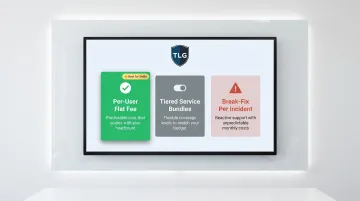
For most small businesses, a flat-rate managed services model is the most budget-friendly long-term option. Watch for hidden costs: extra charges for after-hours calls, on-site visits, or emergency response can erode the value of a low advertised price.
How The Local Guy Delivers Reliable 24/7 IT Support in Utah
The Local Guy has spent over 35 years serving small and mid-sized businesses across Utah — from dental offices managing HIPAA-regulated patient files to local startups building their first IT infrastructure. That depth of local experience shapes how they approach IT support: not as a transactional service, but as a long-term partnership.
Their 24/7 support model is built around proactive monitoring designed to catch issues before they become outages. Core services include:
- Around-the-clock system monitoring to identify and resolve problems before they cause downtime
- Cybersecurity protection covering threat detection, response, and ongoing defense
- Cloud solutions scaled to fit where your business is now and where it's headed
- Responsive helpdesk access via phone at (801) 386-9491 or email at support@thelocalguy.com
The Local Guy's advantage over national MSPs goes beyond proximity. When you call, you're working directly with technicians based in South Salt Lake — people who understand Utah's compliance requirements, local business environments, and the specific growth challenges small businesses here actually face. No call centers, no ticket queues routed overseas.
If your current IT coverage has gaps, reach out to discuss what a 24/7 support plan looks like for your specific setup.
Frequently Asked Questions
What is 24/7 technical support?
24/7 technical support means IT professionals or monitoring systems are available every hour of every day to detect and resolve technical issues — not just during standard business hours. For small businesses, this typically combines automated monitoring with a staffed helpdesk for immediate response.
How much does IT support cost for a small business?
Costs vary by service model — most managed IT providers charge a per-user monthly fee or tiered bundle. Either way, the cost is consistently lower than a single major incident: IBM puts the average breach cost for businesses under 500 employees at $3.31 million.
What is the difference between 24/7 IT support and managed IT services?
Managed IT services is the broader category — outsourced IT management covering systems, security, and infrastructure. 24/7 support refers to around-the-clock availability within that model, and most providers include it as a standard component.
Do I need 24/7 IT support if my business only operates during regular hours?
Yes. Cyber threats, system failures, and corrupted backups don't align with your schedule. Issues that go undetected overnight or over a weekend tend to compound — what could have been a 15-minute fix Friday night becomes a multi-day recovery effort Monday morning.
How does 24/7 IT support help protect against cyberattacks?
Continuous monitoring detects suspicious activity (unauthorized access attempts, malware behavior, unusual data transfers) in real time. That allows for immediate containment, rather than discovering a breach hours or days later when the real damage has already accumulated.