Introduction
Your server crashes on a Tuesday morning. Half your staff can't access patient records. You call the IT guy you used last year — he's booked until Thursday. Sound familiar?
For many Utah small business owners, technology feels like a ticking clock. Costs are unpredictable, problems surface at the worst moments, and there's never a clear plan for what happens when something breaks. Managed IT services exist to solve those exact problems — before they happen.
In plain terms, a managed IT service provider (MSP) takes ongoing responsibility for your business technology: monitoring it, maintaining it, and keeping it secure for a flat monthly fee. No more surprise invoices. No more waiting for something to break before anyone looks at it.
This guide covers everything Utah small businesses need to know:
- What managed IT services are and how they work
- What's typically included in a managed services agreement
- How they differ from traditional break/fix support
- The key benefits for small and mid-sized businesses
- What they typically cost
Key Takeaways
- Managed IT services mean outsourcing your technology management to an MSP on a recurring subscription basis
- Unlike break/fix IT, managed services are proactive — problems are prevented before they disrupt your business
- Core services include network monitoring, cybersecurity, cloud management, helpdesk support, and data backup
- Pricing is typically a flat monthly fee, making IT costs predictable and straightforward to plan for
- SMBs get comprehensive IT support and coverage without the overhead of hiring a full in-house team
What Are Managed IT Services?
Managed IT services is a model where a third-party provider (called a managed service provider, or MSP) takes ongoing responsibility for managing a business's IT infrastructure, systems, and support. The relationship is governed by a service level agreement (SLA) that defines what's covered, response time commitments, and uptime guarantees. Billing is typically a flat monthly fee.
The key distinction is proactive. MSPAlliance defines managed services as "the proactive management of an IT asset or object, by a third party typically known as a MSP, on behalf of a customer" — distinguishing it from break-fix IT, which only responds after something goes wrong.
Who Uses Managed IT Services?
The typical managed IT customer is a small or mid-sized business (SMB) that relies on technology but doesn't have a dedicated in-house IT team. That includes:
- Dental and medical practices navigating HIPAA compliance and patient data security
- Accounting, legal, and financial services firms managing sensitive client records
- Local startups scaling quickly without IT infrastructure in place
- Nonprofits and trade businesses that need reliable systems without a full-time IT hire
CompTIA's IT Industry Outlook 2025 found that 37% of channel firms report their SMB customers have committed to an MSP specifically to access advanced technical skills without retraining internal staff. For most growing SMBs, outsourcing IT management has become the practical default — not an exception.
What Do Managed IT Services Include?
Most MSPs cover five core service areas. Here's what each one actually does for your business.
Remote Monitoring and Management (RMM)
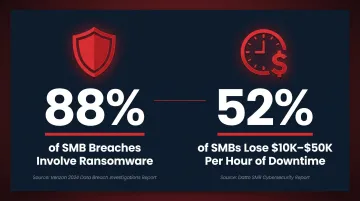
MSPs continuously monitor your servers, networks, and endpoints for performance problems, security threats, and potential outages — often resolving issues before you ever notice them. The ITIC 2024 SMB Security and Hourly Cost of Downtime Survey found 52% of SMBs lose between $10,000 and $50,000 for every hour of downtime — and 83% experienced at least one hour of unplanned downtime in the past year. Catching a failing drive or network bottleneck before it causes an outage is worth real money.
For Utah businesses, that kind of behind-the-scenes monitoring is core to what The Local Guy provides — catching small issues before they snowball into expensive disruptions.
Cybersecurity Services
Managed cybersecurity typically includes:
- Firewall management and configuration
- Antivirus and anti-malware deployment
- Patch management (keeping systems updated)
- Multi-factor authentication (MFA) setup
- Security audits and vulnerability assessments
- Compliance support — HIPAA for dental practices, PCI-DSS for businesses handling payments
New threats appear faster than most businesses can track them — which is exactly why outsourcing this to a dedicated team matters. The Verizon 2025 Data Breach Investigations Report found 88% of SMB breaches involve ransomware — more than double the rate seen at larger organizations.
Cloud Management
MSPs help businesses migrate to cloud platforms and manage ongoing cloud infrastructure. This includes:
- Cloud migration planning and execution
- Microsoft 365 setup and ongoing management
- Cloud security configuration
- Server and software update management
The Local Guy handles this for Utah clients — managing cloud infrastructure locally, including full Microsoft 365 migration from Teams to SharePoint.
Helpdesk and End-User Support
Day-to-day IT support for your employees: troubleshooting software issues, resolving connectivity problems, managing devices. Available via phone, email, or remote access.
The Local Guy offers direct phone and email support — (801) 386-9491 and support@thelocalguy.com — with a focus on fast response times and actual problem resolution, not ticket queues.
Data Backup and Disaster Recovery (BCDR)
MSPs implement and manage regular data backups — on-site, off-site, and cloud-based — along with formal disaster recovery plans. If ransomware hits, hardware fails, or someone accidentally deletes critical files, you have a tested recovery path.
For dental practices and other healthcare businesses, this isn't optional. The HIPAA Security Rule explicitly requires a Data Backup Plan and Disaster Recovery Plan as mandatory safeguards.
Managed IT Services vs. Break/Fix IT Support
How Break/Fix Works
In a break/fix model, you call an IT technician when something goes wrong. They fix it, charge an hourly rate, and leave. There's no ongoing relationship, no proactive oversight, and nobody watching your systems between calls.
The incentive structure is worth noting: the technician earns more when things break. There's no financial motivation for them to prevent problems — their revenue depends on problems existing.
How Managed Services Works Differently
With an MSP, you pay a flat monthly fee. The provider is financially incentivized to prevent problems — every reactive repair eats into their margins. That aligns their interests directly with yours.
| Break/Fix | Managed IT Services | |
|---|---|---|
| Billing | Hourly, per incident | Flat monthly fee |
| Approach | Reactive | Proactive |
| Monitoring | None | 24/7 continuous |
| Cost predictability | Unpredictable | Fixed |
| Incentive | Problems = revenue | Stability = revenue |
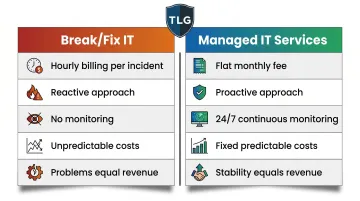
That incentive gap has real consequences for small businesses watching a tight budget. A single hardware failure or ransomware incident can generate a bill far larger than months of managed service fees — and it arrives with no warning.
Key Benefits of Managed IT Services for Small Businesses
Predictable Costs Without the Overhead of In-House Staff
Hiring a full-time IT employee in Utah carries serious cost. BLS data shows Utah network and systems administrators earn a mean of $101,270 annually — before benefits, payroll taxes, training, or workspace, which typically add another 25–40% on top of that.
By comparison, Clutch's 2026 IT Services Pricing Guide (based on verified client reviews) puts average monthly MSP engagements at approximately $5,634. That's a fraction of a single IT hire — and an MSP brings an entire team, not just one generalist.
Access to a Full Team of Specialists
Rather than relying on one employee who has to know everything, managed IT gives you access to specialists across cybersecurity, cloud infrastructure, networking, and compliance. Each specialist stays current in their domain, so you're not betting your infrastructure on one person's bandwidth.
Proactive Monitoring That Actually Prevents Downtime
That specialist coverage matters most in how problems get caught. The 24/7 monitoring approach is what separates managed IT from break-fix support — issues are identified and resolved before they cause outages. The Local Guy runs this proactively for Utah businesses, monitoring networks, endpoints, and servers around the clock and handling maintenance behind the scenes.
Stronger Security and Compliance Coverage
MSPs help businesses implement layered cybersecurity and meet regulatory requirements. For dental practices, this means HIPAA compliance. For businesses processing payments, PCI-DSS. HHS OCR data shows "Private Practices and Physicians" are the second most common HIPAA violator category — with $144.9 million in total enforcement penalties collected. Those fines hit practices that assumed someone else was handling it. An MSP makes compliance an ongoing process, not an annual scramble.
Your Team Can Focus on Actual Work
When IT is handled externally, employees stop losing time to troubleshooting and workarounds. For small businesses without dedicated IT staff, that shift is noticeable fast:
- Help desk requests get routed to professionals instead of the "office tech person"
- Software issues and connectivity problems get resolved without pulling staff off their actual work
- New hires get set up correctly the first time, without improvised onboarding
How Much Do Managed IT Services Cost?
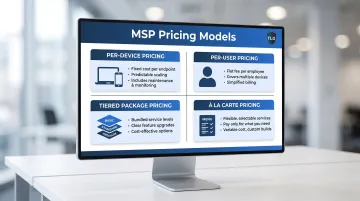
There's no universal price. Cost depends on the scope of services, number of users or devices, and the level of support included. That said, there are four standard pricing models:
- Per-device pricing: A flat fee for each managed device (server, workstation, mobile). Simple and scales with your environment.
- Per-user pricing: A flat fee per employee per month, covering all devices that user works with. Works well when employees use multiple devices.
- Tiered (packaged) pricing: Services bundled into basic, standard, and premium tiers. Businesses choose the level that fits now and upgrade as they grow.
- À la carte pricing: Select only the specific services you need. Flexible, but can get expensive quickly if multiple services are required.
What Does It Actually Cost?
Clutch's verified pricing data puts average MSP hourly rates at $100–$149/hour, with most managed services engagements in the $10,000–$49,999 annual range and average monthly recurring costs around $5,634.
The real comparison is MSP cost against the total cost of downtime, data breaches, emergency repair bills, and lost productivity. For most Utah SMBs, managed services come out ahead once those factors are included.
A pricing assessment from a local MSP gives you the clearest picture. The Local Guy offers consultations for Utah businesses — call (801) 386-9491 to find out which services fit your situation and what they'd run you.
Frequently Asked Questions
What are managed IT services?
Managed IT services involve outsourcing your technology management to a third-party provider that handles monitoring, maintenance, cybersecurity, and support on a recurring subscription basis. Unlike traditional IT support, the relationship is ongoing — not just a one-time fix when something breaks.
What does a managed IT service provider do?
An MSP remotely monitors and manages your IT systems, applies updates and patches, protects against cyber threats, and responds to issues as they arise — acting as your outsourced IT department. Most operate 24/7 to ensure systems stay secure and operational without requiring a full-time internal team.
What do managed IT services include?
Core services typically cover network monitoring, cybersecurity (firewalls, antivirus, patch management), cloud management, helpdesk support, and data backup and disaster recovery. The specific services included will vary by provider, so ask for a clear breakdown before signing any agreement.
How much do managed IT services cost?
Costs vary by provider and scope, with common models including per-device, per-user, or tiered package pricing. Most small businesses find managed IT more cost-effective than break/fix or in-house IT once downtime costs, security risks, and the full cost of hiring are factored in.
What are fully managed IT services?
Fully managed IT means the MSP takes complete responsibility for all IT functions — serving as your entire IT department. This differs from co-managed services, where the MSP supplements an existing internal IT team rather than replacing it.
What is the difference between IT services and managed services?
Traditional IT services (break/fix) are reactive and billed per incident — you pay when something breaks. Managed IT services involve an ongoing proactive relationship with continuous monitoring, preventive maintenance, and a fixed monthly fee regardless of how many issues arise.