For Utah businesses, the stakes are real. A single breach can mean days of downtime, lost client trust, regulatory penalties, and recovery costs that most SMBs aren't prepared for.
This guide covers everything you need to protect your network: the most common threats targeting businesses right now, the essential tools that form a solid security stack, how layered defense works in practice, and what to look for when choosing a cybersecurity partner.
TL;DR: Quick Takeaways
- Small businesses aren't safe — nearly half of all cyberattacks target organizations with fewer than 1,000 employees
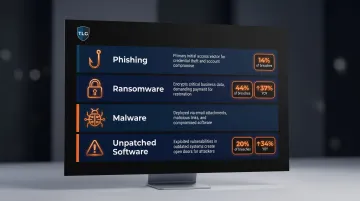
- The biggest threats are phishing, ransomware, malware, and unpatched software vulnerabilities
- Layered defense (firewalls, MFA, EDR, backups, training) outperforms any single security tool
- Healthcare and dental practices face disproportionate risk and strict HIPAA compliance requirements
- Proactive monitoring significantly cuts breach costs — reactive response averages hundreds of thousands more per incident
Why Cybersecurity Matters for Every Business
Many business owners assume hackers are focused on Fortune 500 targets. The data tells a different story.
Organizations with fewer than 500 employees face an average data breach cost of $3.31 million, a 13.4% increase from 2022, according to the IBM Cost of a Data Breach Report 2024. That number excludes indirect costs, which compound quickly once an attack unfolds.
The Four Consequences of a Successful Attack
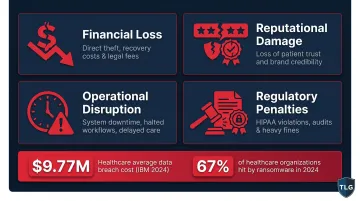
A breach doesn't just cost money upfront. The fallout typically hits four areas simultaneously:
- Financial loss — direct theft, ransom payments, legal fees, and recovery costs
- Reputational damage — lost customer trust that can take years to rebuild
- Operational disruption — downtime, data loss, and halted business functions
- Regulatory penalties — HIPAA violations for healthcare and dental practices can result in significant fines
Each of those consequences hits harder in certain industries — and healthcare sits at the top of that list. Healthcare is the most expensive industry for breaches at $9.77 million average (IBM 2024), and 67% of healthcare organizations were hit by ransomware in 2024 — a four-year high. Dental practices carry that same exposure by operating under the same HIPAA requirements and patient data obligations.
Proactive vs. Reactive: The Cost Gap Is Clear
The IBM research shows that organizations detecting breaches internally save nearly $1 million in breach costs compared to those where attackers disclose the incident. Businesses that wait until after a breach to invest in security face dramatically higher recovery costs — and a much longer road back to normal operations.
This is why continuous 24/7 monitoring — the kind The Local Guy provides to Utah businesses — is structured around detection before escalation, not damage control after the fact.
The Most Common Cyber Threats Targeting Business Networks
Phishing and Social Engineering
Phishing remains one of the most effective attack methods because it targets people, not systems. An employee clicks a convincing email link, enters their credentials on a fake login page, and an attacker has everything they need to move through your network.
Phishing accounts for 14% of breaches as an initial access vector (Verizon 2025 DBIR), and it frequently serves as the entry point for larger attacks like ransomware. Social engineering as a breach pattern jumped from 9% to 17% year-over-year in the same report — a significant escalation.
Ransomware
Ransomware was present in 44% of all reviewed breaches in 2025 — a 37% year-over-year increase (Verizon 2025 DBIR). The median ransom payment was $115,000, though 75% of SMBs report they couldn't continue operating if hit by ransomware.
Modern ransomware groups use double extortion: they steal data before encrypting it, then threaten to publish it unless paid. Healthcare and dental practices are frequent targets because time-sensitive operations increase pressure to pay quickly.
Malware and Viruses
Malware covers a wide range of threats — viruses, worms, trojans, and spyware — each designed to infiltrate systems and cause damage before you notice anything is wrong. Common delivery methods include:
- Malicious email attachments disguised as invoices or documents
- Drive-by downloads from compromised websites
- Trojanized software that installs hidden backdoors on first run
Once inside, malware can exfiltrate sensitive data, lock down operations, or silently create access points for follow-on attacks.
Insider Threats
Not every threat comes from outside. Disgruntled employees, accidental data exposure, or overly broad access permissions can create serious vulnerabilities. In small businesses where staff often have wide system access, a single compromised or careless employee can expose the entire network.
Unpatched Software and Known Vulnerabilities
Attackers don't always need sophisticated tools — sometimes a missed software update is enough. Exploitation of known vulnerabilities accounted for 20% of breaches in the Verizon 2025 DBIR — a 34% year-over-year increase that now surpasses phishing as an initial access vector. Most of these attacks target flaws that vendors have already patched, but that businesses haven't yet deployed across their systems. Keeping software current is one of the highest-ROI defenses available.
Essential Cybersecurity Solutions Every Enterprise Network Needs
Foundational Network Defenses
Firewalls and IDS/IPS
Firewalls act as the first barrier between your internal network and external threats, filtering incoming and outgoing traffic based on defined rules. Intrusion Detection and Prevention Systems (IDS/IPS) go further, actively monitoring traffic for suspicious patterns and blocking potential attacks before they reach the network interior.
For businesses without dedicated IT staff, these tools need to be configured correctly from the start. A misconfigured firewall offers false confidence more than real protection.
Multi-Factor Authentication (MFA)
MFA is the single highest-ROI control any business can implement immediately. According to CISA, MFA makes accounts 99% less likely to be compromised — and Microsoft research confirms it blocks over 99.9% of automated account attacks.
Despite this, major breaches continue to occur because MFA isn't enabled everywhere it should be. Every business email account, remote access tool, and admin console needs it.
Endpoint and Data Protection
Antivirus, Anti-Malware, and EDR
Traditional antivirus detects known threats by matching file signatures. It works for established malware — but it's powerless against fileless attacks that operate entirely in memory, or zero-day exploits that haven't been cataloged yet.
Endpoint Detection and Response (EDR) uses behavioral analysis and machine learning to identify suspicious patterns regardless of whether the threat is known. IBM notes that up to 90% of successful cyberattacks originate at endpoint devices, which is why modern businesses — especially those with remote or hybrid teams — need EDR, not just antivirus.
Data Encryption and DLP
Encryption protects data in transit and at rest. If an attacker accesses encrypted data, they can't read or use it. Data Loss Prevention (DLP) tools add another layer by monitoring and controlling data movement, preventing unauthorized sharing of sensitive files like patient records or financial data.
For dental practices handling protected health information, both controls are directly relevant to HIPAA technical safeguard requirements.
Together, endpoint protection and data controls reduce breach impact — but no security stack is complete without a recovery plan when something slips through.
Operational Resilience
Backup and Disaster Recovery
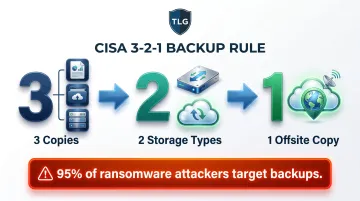
Secure, regularly tested backups are the primary recovery mechanism after ransomware. The CISA-recommended 3-2-1 backup rule provides a clear framework:
- 3 copies of important data
- 2 different storage media types
- 1 copy stored offsite or in the cloud
One caution: untested backups are nearly as risky as no backups. Among healthcare ransomware victims, 95% reported that attackers attempted to compromise their backups (Sophos 2024). Offsite and offline copies aren't optional — they're the last line of recovery.
Patch Management
Given that unpatched vulnerabilities now account for 20% of breaches, systematic patch management isn't a nice-to-have. Automated patch management ensures critical updates across operating systems, applications, and firmware get applied promptly — not on a delayed, ad-hoc schedule.
The 7 Layers of Cybersecurity: A Defense-in-Depth Approach
No single security tool provides complete protection. Defense-in-depth is the principle that multiple overlapping layers ensure that if one control fails, others catch the threat.
CISA defines it as employing "a holistic approach to protect all assets, while taking into consideration its interconnections and dependencies." Here's how those layers break down:
| Layer | What It Covers |
|---|---|
| Physical | Server rooms, workstations, device access controls |
| Network | Firewalls, VPNs, network segmentation |
| Perimeter | IDS/IPS, DMZ, external threat filtering |
| Endpoint | Antivirus, EDR, patch management per device |
| Application | Web application firewalls, software security controls |
| Data | Encryption, DLP, regular backups |
| Human | Security awareness training, phishing simulations, policies |
The Physical and Network Layers
Physical security is frequently overlooked by SMBs — but an unlocked server room or an unattended laptop creates exposure that no software can fix. Network segmentation at the perimeter layer limits lateral movement: if an attacker breaches one segment, they can't automatically reach everything else.
Practical controls at these layers include:
- Keycard or badge access for server rooms and network closets
- Cable locks and asset tagging for portable devices
- VLAN segmentation to isolate sensitive systems from general traffic
- Firewall rules that enforce least-privilege access between segments
The Data and Human Layers
Technical controls only go so far. The human layer deserves extra attention: approximately 60% of breaches involve the human element (Verizon 2025 DBIR), including errors, social engineering, and credential misuse. Employees are simultaneously the biggest vulnerability and, when properly trained, the strongest last line of defense.
Ongoing security awareness training and phishing simulations shift staff from a liability into an active part of your security posture. Most security frameworks recommend training at least quarterly, with simulated phishing tests run monthly to keep threat recognition sharp.

How to Choose the Right Cybersecurity Solution for Your Business
Key Evaluation Criteria
When assessing cybersecurity solutions, prioritize:
- Scalability — does it grow as your business does?
- Integration — does it work with your existing tools and workflows?
- Multi-layer coverage — does it address network, endpoint, data, and human layers?
- 24/7 monitoring and support — threats don't keep business hours
- Compliance alignment — HIPAA for dental and healthcare, with documented controls
The Case for Managed Cybersecurity Services
47% of businesses with fewer than 50 employees have no dedicated cybersecurity budget, and 51% operate with no security measures at all. Hiring even one qualified cybersecurity analyst typically costs $80,000–$130,000+ annually — before tools, training, and 24/7 coverage requirements.
A managed cybersecurity services provider (MSSP) bundles monitoring, updates, incident response, and compliance support into a predictable monthly cost that's accessible for most SMBs.
The Local Guy provides this coverage for businesses across Utah — 24/7 monitoring, dental IT compliance support, and a local team that responds with context about your specific environment. When an incident is unfolding, that local accountability matters more than a generic helpdesk ticket.
Cost vs. Risk
Cybersecurity spending isn't an IT expense — it's risk management. Organizations with severe security staffing shortages pay $1.76 million more per breach than organizations with adequate security in place (IBM 2024).
Preventative managed security costs a fraction of breach recovery costs, legal fees, regulatory fines, and lost revenue. For most SMBs, that comparison makes the decision clear.
Frequently Asked Questions
What are the best cybersecurity solutions for small businesses?
Start with the foundational stack: firewalls, MFA, antivirus/EDR, regular data backups, and employee security training. A managed IT provider can implement and monitor all of these affordably — often for less than the cost of a single breach.
What cybersecurity solutions and services are available?
Five main categories cover the field: network security (firewalls, IDS/IPS), endpoint protection (antivirus, EDR), data security (encryption, DLP, backups), identity management (MFA, access controls), and managed security services covering monitoring, incident response, and compliance.
What are common cybersecurity problems and solutions?
The most frequent problems pair directly with their fixes: phishing → security awareness training; ransomware → tested backups and EDR; unpatched software → automated patch management; weak passwords → MFA. Together, these four cover the majority of attack vectors SMBs face.
What are the main types of cybersecurity?
The primary domains are network security, endpoint security, application security, cloud security, data security, and operational security. Each addresses a different layer of an organization's digital environment, which is why no single tool provides complete protection.
What are the most common cyber attacks?
Phishing, ransomware, malware, DDoS attacks, insider threats, and man-in-the-middle attacks are the most frequently encountered threats. Ransomware and phishing together account for a large share of successful breaches against SMBs.
What are the 5 C's of cybersecurity?
The 5 C's are a practical industry framework: Change, Compliance, Cost, Continuity, and Coverage. Not a formal standard, but a useful lens for evaluating whether your security posture has any gaps.