Introduction
Medical practices hold some of the most sensitive personal data in existence — and a single IT misstep can be expensive. HIPAA civil monetary penalties now reach $2,190,294 per violation in the most severe tier, per the January 2026 Federal Register inflation adjustment. Even at the lowest tier, a "lack of knowledge" violation can cost up to $73,011.
The core problem is structural. Most small and mid-sized medical practices don't have a dedicated IT department, and many general IT providers don't understand healthcare-specific compliance requirements. That leaves practices unknowingly exposed — not through negligence, but through a simple mismatch between what they have and what they need.
This guide breaks down what HIPAA actually requires from your IT infrastructure, what a fully compliant managed IT service should include, and which questions to ask before signing with any provider.
Key Takeaways
- HIPAA mandates administrative, physical, and technical safeguards to protect electronic protected health information (ePHI)
- Any IT provider accessing your systems must sign a Business Associate Agreement (BAA) — its absence alone is a violation
- Proactive 24/7 monitoring isn't optional; healthcare ransomware attacks increased 30% in early 2025
- Shared logins, unencrypted devices, and outdated software are among the most common — and costly — HIPAA violations
- Choose a provider with documented healthcare IT experience, not just general business IT support
What HIPAA Requires From Your Medical Practice's IT Systems
The HIPAA Security Rule applies to every covered entity that transmits health information electronically, including solo practitioners. There are no size exemptions, and compliance isn't a one-time setup. It's an ongoing operational requirement across three categories of safeguards.
Administrative Safeguards
Administrative safeguards govern how your practice manages security at the organizational level. Core requirements include:
- Designating a security officer responsible for developing and enforcing security policies
- Conducting regular risk assessments to identify vulnerabilities to ePHI
- Managing staff access based on role and minimum-necessary principles
- Training all workforce members on safe data handling
- Maintaining written policies and procedures for at least six years
Risk assessments are particularly critical, and frequently mishandled. OCR's Risk Analysis Initiative has produced at least 12 enforcement actions as of early 2026. In April 2025, Northeast Radiology paid $350,000 after failing to conduct an accurate risk analysis, resulting in unauthorized access to ePHI for nearly 300,000 patients.
That case makes the requirement clear: risk assessments must be repeated whenever technology, workflows, or personnel change. A one-time setup review doesn't satisfy the rule.
Physical Safeguards
Physical safeguards cover who can physically access the equipment and spaces where ePHI is viewed or stored. Your practice needs:
- Automatic screen locks on all workstations
- Privacy screens in patient-visible areas
- Controlled access to areas where ePHI is viewed
- Documented disposal procedures for retired devices and storage media
Off-site mobile devices, including phones, tablets, and laptops, fall under physical safeguards too. Any device accessing ePHI remotely must have encryption and remote-wipe capability configured before first use.
Technical Safeguards
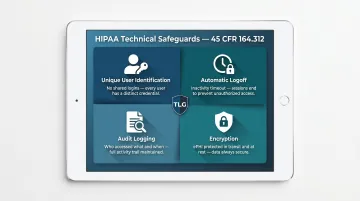
Four core technical standards apply under 45 CFR 164.312:
- Unique user identification: no shared logins under any circumstances
- Automatic logoff after a defined period of inactivity
- Audit logging that records who accessed what ePHI and when
- Encryption covering ePHI both in transit and at rest
HIPAA doesn't mandate specific products. It requires controls that are "reasonable and appropriate" based on your own risk assessment. The right configuration for a three-provider dental office differs substantially from a 20-provider medical group. That's why an IT partner should help calibrate your setup against your actual risk profile, not hand you a generic checklist and walk away.
What HIPAA-Compliant Managed IT Services Actually Include
Standard break-fix IT — where someone shows up after something breaks — doesn't work in a healthcare environment. A HIPAA-compliant managed IT provider takes proactive, ongoing responsibility for security and system stability, monitoring and patching continuously instead of scrambling after damage is done.
24/7 Network Monitoring and Threat Detection
Continuous monitoring means scanning in real time for unauthorized access attempts, anomalous data activity, and system vulnerabilities. According to IBM's 2024 Cost of a Data Breach Report, the average healthcare breach cost $9.77 million — the highest of any industry for 14 consecutive years. Detection took an average of 194 days, with another 64 days to contain it. A practice without active monitoring is flying blind for months after an intrusion begins.
Access Control and Identity Management
A compliant provider handles the full lifecycle of user credentials:
- Creating unique user accounts for every staff member
- Configuring role-based access permissions (minimum-necessary principle)
- Enabling and enforcing multi-factor authentication (MFA)
- Immediately deactivating accounts when employees leave
That last point is critical. Failure to deactivate former employee credentials is one of the most common HIPAA violations — and one of the most preventable.
Encryption and Secure Data Backup
Device-level encryption is among the most cost-effective compliance investments a practice can make. In 2020, Lifespan Health System paid $1,040,000 after a single stolen unencrypted laptop exposed the ePHI of 20,431 patients.
A compliant backup strategy requires:
- Full-disk encryption on all workstations, laptops, and mobile devices
- Encrypted email and file-transfer protocols
- Daily automated backups stored in encrypted offsite or cloud locations
- Regular restoration testing — because an untested backup is not a backup
HIPAA Documentation and Compliance Support
Technical controls alone won't pass an audit. A qualified managed IT provider helps produce and maintain the documentation OCR actually looks for:
- Written security policies and procedures
- Risk assessment records
- Staff training logs
- Access control reviews
- Incident response plans
Without documentation, a technically secure practice can still fail a compliance review. OCR auditors don't assume controls are in place — they require written proof that those controls were implemented, tested, and maintained.
The Most Common HIPAA IT Failures in Medical Practices
Most breaches don't come from sophisticated attacks. They come from predictable, preventable gaps.
Shared Logins and Missing MFA
When multiple staff share a single login, there's no audit trail of individual ePHI access. If a breach occurs, there's no way to determine who accessed what — or whether it was internal misuse. This is a basic HIPAA violation and an investigative dead end.
Unencrypted Devices and Poor Mobile Device Management
A lost or stolen device without encryption automatically triggers a reportable HIPAA breach. The Lifespan case above illustrates what that looks like financially. Any device that touches ePHI — laptops, tablets, USB drives — needs full-disk encryption configured before use, not after.
Outdated Software and Skipped Security Patches
Older operating systems and unpatched applications contain known vulnerabilities that ransomware exploits directly. HHS settled four ransomware investigations simultaneously in 2025-2026, with every case citing failures in risk analysis, access controls, or audit logging.
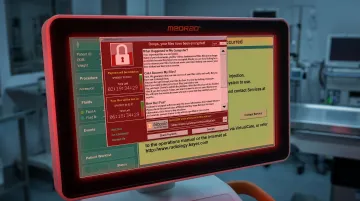
Healthcare is a high-value target precisely because patient records bundle financial, medical, and identity information into a single file.
Why Your Managed IT Provider Must Sign a Business Associate Agreement
Any third party that may encounter ePHI while providing services to your practice is classified as a Business Associate under HIPAA — including your IT support company. Before they touch your systems, they must sign a Business Associate Agreement (BAA).
HHS confirms that the absence of a BAA is itself a HIPAA violation, regardless of whether any breach occurs. If your current IT provider has access to systems containing ePHI and hasn't signed a BAA, your practice is already non-compliant.
That responsibility doesn't stop with your direct IT provider. Under the HITECH Act, any subcontractors they use — remote monitoring platforms, cloud backup vendors, ticketing systems — must also be covered by BAAs.
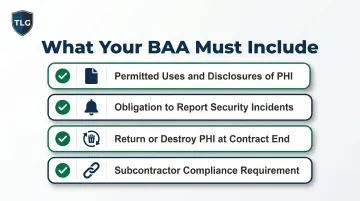
Before signing with any IT provider, confirm their BAA includes:
- Permitted uses and disclosures of PHI
- Their obligation to report security incidents to your practice
- Their responsibility to return or destroy PHI at contract end
- Their agreement to ensure subcontractors meet the same standards
How to Choose a HIPAA-Compliant Managed IT Provider for Your Medical Practice
Not every IT provider is equipped to support a healthcare environment. Here's what to prioritize:
- Healthcare-specific experience: A provider working primarily with general businesses is unlikely to understand how EHR systems, dental imaging software, or medical billing workflows intersect with HIPAA. Ask directly about their healthcare history — not just "we support regulated industries."
- Proactive processes, not promises: The right provider can walk you through how they conduct risk assessments, manage staff onboarding and offboarding from a security standpoint, and produce documentation during an audit. "We keep things secure" is not a compliance process.
- Willingness to sign a BAA: Any provider who hesitates or refuses to sign a Business Associate Agreement should not be trusted with a medical practice's IT environment — period.
If you're a Utah medical or dental practice evaluating providers, The Local Guy is one option worth considering. Based in South Salt Lake, they've spent over 35 years working with local businesses, have specialized experience in dental IT compliance and high-security network design, and sign BAAs as a standard part of their agreements. Reach them at (801) 386-9491 or support@thelocalguy.com.
Questions to ask any prospective provider before signing:
- Do you sign Business Associate Agreements?
- Have you supported medical or dental EHR systems before? Which ones?
- How do you document risk assessments and security policies?
- What is your guaranteed response time for a critical system outage?
Frequently Asked Questions
What are the requirements for a HIPAA-compliant laptop?
Any laptop accessing ePHI needs full-disk encryption (BitLocker for Windows, FileVault for macOS), a unique login with MFA enforced, automatic screen lock after inactivity, updated endpoint protection, and remote-wipe capability if used off-site. These requirements apply regardless of whether the device is practice-owned or personal.
Which laptop is best for medical billing and coding?
HIPAA doesn't specify a brand or model — it specifies security standards. Windows laptops with BitLocker enabled and a reputable endpoint protection suite are widely used in healthcare environments. The security configuration matters far more than the hardware choice.
Is HIPAA or 42 CFR Part 2 more strict?
42 CFR Part 2, which governs substance use disorder treatment records, is generally stricter. It requires explicit patient consent for nearly all disclosures — including to other treating providers — whereas HIPAA permits broader sharing for treatment, payment, and healthcare operations without patient authorization.
What are the new HIPAA requirements for 2025 and 2026?
HHS published a Notice of Proposed Rulemaking in January 2025 that would mandate MFA, require encryption for all ePHI, add network segmentation requirements, and eliminate the "addressable" specification category. As of mid-2026, the rule remains proposed — not finalized — so work with your managed IT provider now to identify any gaps before it takes effect.
Does a managed IT provider need to sign a Business Associate Agreement?
Yes — any IT provider with potential access to systems containing ePHI must sign a BAA before beginning work. Any provider who refuses should not be given access to your practice's systems under any circumstances.
What happens if my medical practice experiences a HIPAA data breach?
Contain the incident immediately, notify affected individuals within 60 days, and report to HHS. If 500 or more individuals in a state are affected, notify local media as well. Document every step of the response. Having an incident response plan in place before a breach occurs — ideally developed with your managed IT provider — significantly limits the damage and reduces your regulatory exposure.